Ready to cash out your Google Play Gift Card? Follow these five simple steps to redeem your rewards:
- Head to the Cashout Page: Access it via the "Cashout" tab on the left-hand sidebar (Desktop) or the bottom navigation bar (Mobile).
- Select Google Play: Choose the Google Play Gift Card option from the rewards list.
- Choose a Value: Pick the USD amount you wish to withdraw.
- Confirm the Policy: Review the non-return policy for digital codes.
- Withdraw: Click the button to finalize your request.
Redeeming Your Gift Card
Once you have selected the Google Play option, choose your preferred gift card value.
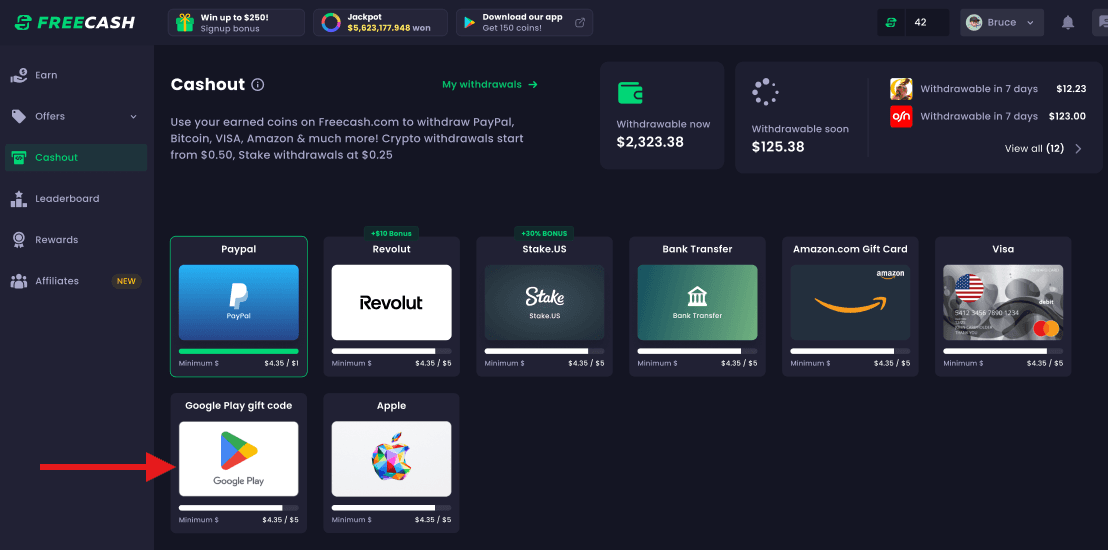 Select Google Play Value · November, 2024
Confirm the non-return policy and click "Withdraw."
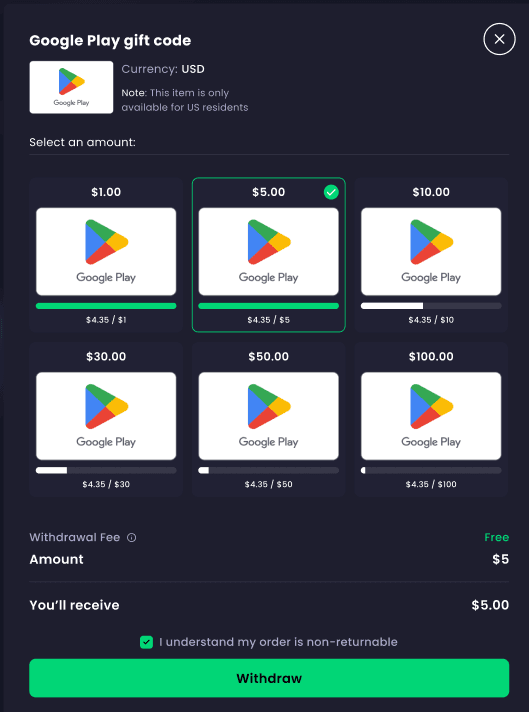 Confirm and Withdraw · November, 2024
Processing Time: Most withdrawals are approved and sent to your email within a few minutes. In some cases, it may take up to 30 minutes for the code to arrive.
Regional Availability
Google Play Gift Codes are currently available for users in the following countries:
- United States of America
- Canada
- France
- Germany
- Japan
- Mexico
- South Korea
- United Kingdom
Important: Please ensure your account region matches the gift card country before withdrawing, as digital codes are region-locked and non-refundable.



'%3e%3cpath%20fill='%23eee'%20d='m0%200%208%2022-8%2023v23l32%2054-32%2054v32l32%2048-32%2048v32l32%2054-32%2054v68l22-8%2023%208h23l54-32%2054%2032h32l48-32%2048%2032h32l54-32%2054%2032h68l-8-22%208-23v-23l-32-54%2032-54v-32l-32-48%2032-48v-32l-32-54%2032-54V0l-22%208-23-8h-23l-54%2032-54-32h-32l-48%2032-48-32h-32l-54%2032L68%200H0z'/%3e%3cpath%20fill='%230052b4'%20d='M336%200v108L444%200Zm176%2068L404%20176h108zM0%20176h108L0%2068ZM68%200l108%20108V0Zm108%20512V404L68%20512ZM0%20444l108-108H0Zm512-108H404l108%20108Zm-68%20176L336%20404v108z'/%3e%3cpath%20fill='%23d80027'%20d='M0%200v45l131%20131h45L0%200zm208%200v208H0v96h208v208h96V304h208v-96H304V0h-96zm259%200L336%20131v45L512%200h-45zM176%20336%200%20512h45l131-131v-45zm160%200%20176%20176v-45L381%20336h-45z'/%3e%3c/g%3e%3c/svg%3e)