
To cash out your Freecash earnings in Amazon gift cards, follow these steps:
- Go to the Freecash Cashout page
- Select the Amazon gift card amount you want as your method of withdrawal
- In the pop-up, tick the box 'I understand my order is non-refundable'
- Press the 'Withdraw' button
- Wait for your reward email, then follow the link contained within
- Use the security code from the reward email to pass the security check, which will reveal your gift card code
- Enter the gift card code at Amazon's redemption page
Detailed instructions below.
1. Navigate to the Cashout Page
You can go to the Cashout page at any time by selecting your current account funds, which are shown in the top-right corner on desktop and at the top of the page on mobile.
February, 2025
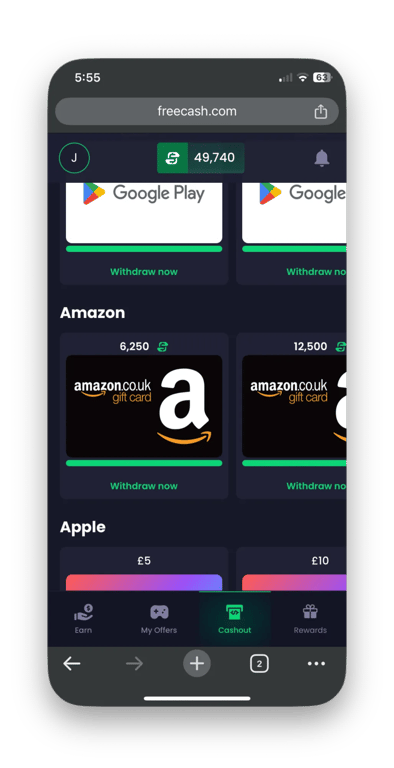
2. Select the Amazon Gift Card You Want to Withdraw
On the Cashout page, you will find Amazon gift cards, starting from as low as $5. Select the Amazon gift card amount you would like to withdraw.
3. Confirm That You Understand the Order Is Non-Refundable
Tick the box to confirm you understand the order is non-refundable. And before you do so, make sure you really are certain you would like to withdraw your fund via Amazon.
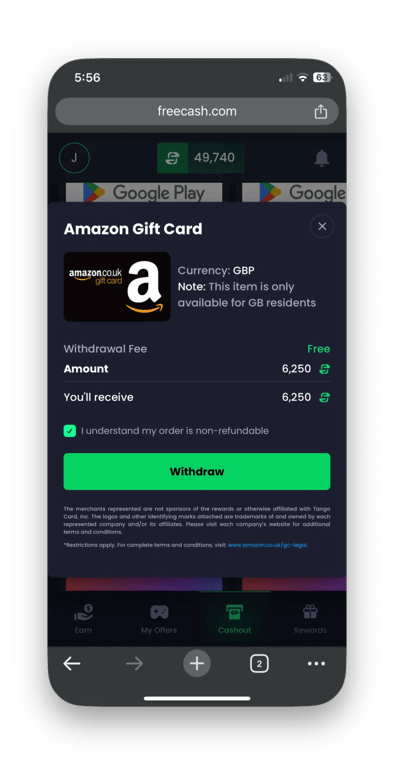
4. Press the 'Withdraw' Button
Once you have ticked the checkbox, you can now press the 'Withdraw' button. If this is your first withdrawal, you may be asked to confirm your ID with us.
5. Wait for Your Reward Email
You will receive a confirmation email first. About ten minutes later, you will receive a second email that contains a link to your Amazon gift card code.
The second email will also contain a security code, which you will need to use when following the link.
6. Reveal Amazon Gift Card Code
By following the link in the second email and using the security code, you will reveal the Amazon gift card code. Copy this code now.
7. Enter the Gift Card Code on Amazon's Redemption Page
Visit Amazon's redemption page, log in to your account, and enter your gift card code. Congratulations, you can now enjoy spending your Freecash earnings!
How Long Do Amazon Withdrawals Take?
Our team is working hard to process your withdrawal quickly. Most are approved in a few minutes, but in some instances it may take up to 30 minutes. If it takes longer, contact support.
Amazon Gift Card Availability
You can withdraw your Freecash funds as Amazon gift cards in the following countries:
- United States of America
- Austria
- Australia
- Belgium
- Canada
- Czechia
- France
- Germany
- India
- Ireland
- Italy
- Japan
- Lebanon
- Luxembourg
- Mexico
- Monaco
- Netherlands
- New Zealand
- Poland
- Portugal
- Saudi Arabia
- Singapore
- Spain
- Sweden
- United Arab Emirates
- United Kingdom


'%3e%3cpath%20fill='%23eee'%20d='m0%200%208%2022-8%2023v23l32%2054-32%2054v32l32%2048-32%2048v32l32%2054-32%2054v68l22-8%2023%208h23l54-32%2054%2032h32l48-32%2048%2032h32l54-32%2054%2032h68l-8-22%208-23v-23l-32-54%2032-54v-32l-32-48%2032-48v-32l-32-54%2032-54V0l-22%208-23-8h-23l-54%2032-54-32h-32l-48%2032-48-32h-32l-54%2032L68%200H0z'/%3e%3cpath%20fill='%230052b4'%20d='M336%200v108L444%200Zm176%2068L404%20176h108zM0%20176h108L0%2068ZM68%200l108%20108V0Zm108%20512V404L68%20512ZM0%20444l108-108H0Zm512-108H404l108%20108Zm-68%20176L336%20404v108z'/%3e%3cpath%20fill='%23d80027'%20d='M0%200v45l131%20131h45L0%200zm208%200v208H0v96h208v208h96V304h208v-96H304V0h-96zm259%200L336%20131v45L512%200h-45zM176%20336%200%20512h45l131-131v-45zm160%200%20176%20176v-45L381%20336h-45z'/%3e%3c/g%3e%3c/svg%3e)